Module 4 - Week 2 & Field Activity 4 Overview
Assignments
- [X] Task 1: Connect Micro:bit with another Micro:bit and send data over radio communication
- [X] Task 2: Answer the 3 reflection questions
Process
For task 1, I worked with a fellow FLA participant and visited the local fab lab together. With the guidance from the instructor, one of our Microbits would be the sender and the other one would be the receiver. The task was to send a “YES” message when button A is pressed and a “NO” message when button B is pressed.
First, I began by programming the Microbit as a sender on Makecode editor using the radio send blocks. My partner and I have chosen our radio set group to be 1.
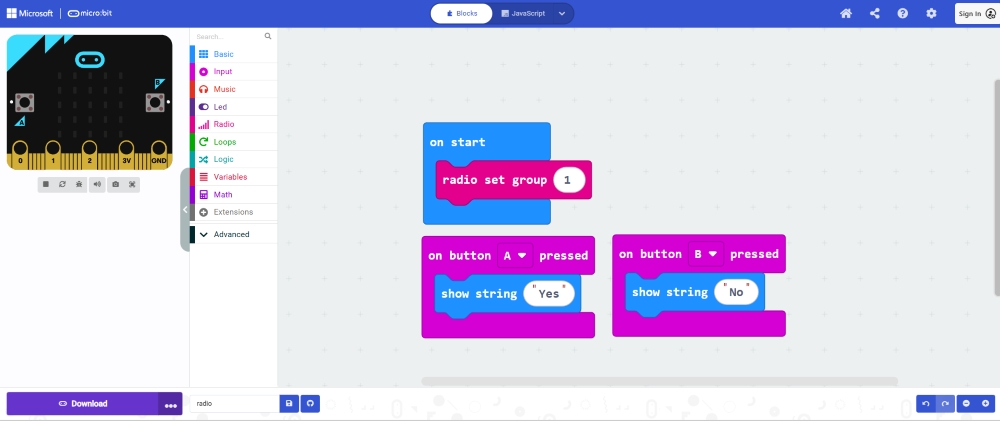 – Sender codes
Next, my partner programmed her Microbit as a receiver on Makecode editor using the radio receiver blocks.
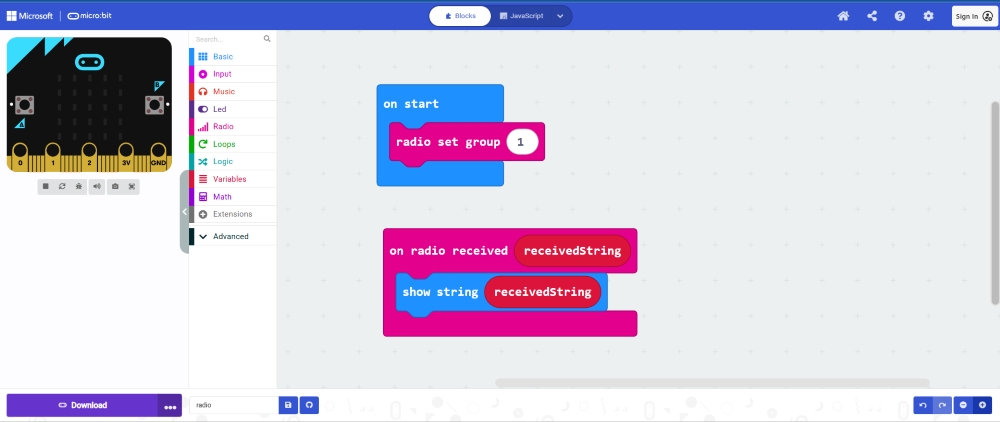 – Receiver codes
We tested our program and it worked successfully.
Tasks in the Fab Lab
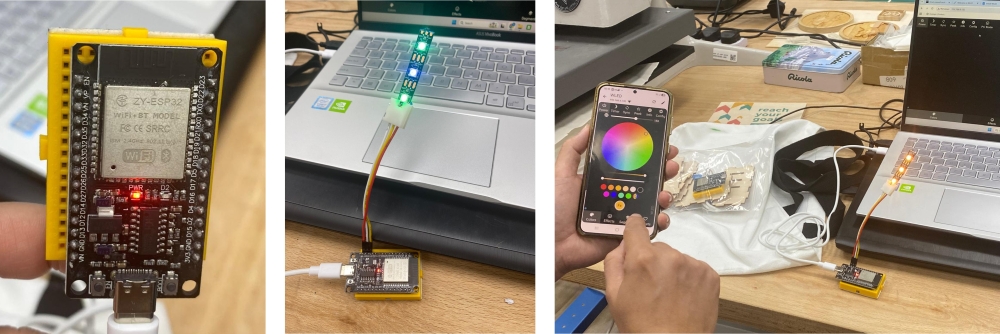
During the visit to the local fab lab, the instructor explained how IoT works. He demonstrated how to install and connect a ESP32 microcontroller (https://install.wled.me) and program the LED strip with the WLED app on his phone.
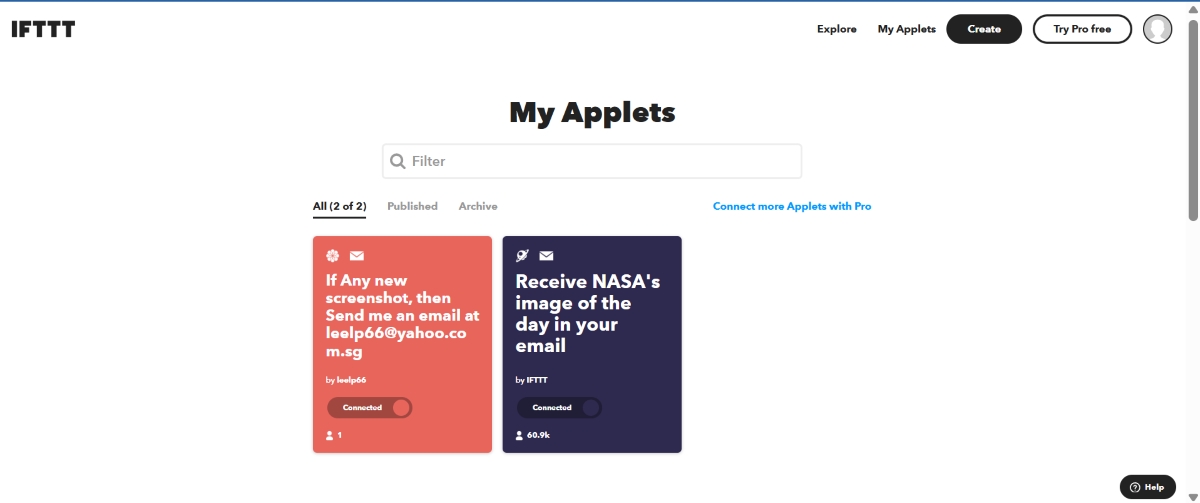
We also learnt how to use IFTTT to connect to services such as emailing a mobile screenshot photo automatically to ourselves.
Challenges and solutions
One key challenge I faced was my limited understanding of IoT concepts, as this area is completely new to me. I initially struggled to grasp how devices communicate through different methods such as sensors, micro:bit, and data transmission systems. The “invisible” nature of these connections made it difficult to visualise how information flows within an IoT system.
To overcome this, I broke down the learning into smaller parts, starting with basic input–process–output systems before exploring simple communication methods like micro:bit radio. In addition, guidance from the instructor at the local fab lab, through clear explanations and demonstrations, helped me better understand these concepts.
Another challenge was translating IoT concepts into meaningful classroom applications. I addressed this by simplifying ideas into real-world examples and planning to introduce them progressively through Makers’ Friday activities.
Overall, I adopted a teacher-as-learner mindset, embracing experimentation and reflection, which helped me build confidence and deepen my understanding of IoT in an authentic way.
Reflection Question 1:
What are some opportunities in your context to work within your local community? Who you could collaborate with? How? What should happen to succeed in the collaboration
There are strong opportunities within my school context to collaborate with the local community to create authentic and meaningful learning experiences. One key opportunity is engaging parents and external organisations, such as LionsForge, through initiatives like the Little Hands Big Hearts community projects. These platforms allow students to design solutions that address real-world needs while strengthening school–community partnerships.
Another opportunity is participation in national-level programmes and competitions, such as the Singtel x LionsForge Inclusive Hackathon. These experiences provide authentic contexts for students to apply design thinking, digital fabrication, and problem-solving skills in meaningful ways.
I also see value in collaborating with youth volunteers, such as students from tertiary Engineering Interest Groups. These volunteers can share their knowledge and expertise in areas like digital fabrication and coding, while serving as relatable role models who inspire and guide students during the prototyping process.
Collaboration can be strengthened by involving partners as mentors, facilitators, and authentic audiences who provide feedback. Parents can also support students in research and ideation.
For successful collaboration, there must be clear communication, aligned goals, and sustained partnerships, ensuring meaningful and lasting impact on students’ learning and development.
Reflection Question 2:
What are the next steps in further development of a makerspace in your school? How do you envision the maker space?
As a next step in developing the makerspace, my focus is on moving beyond the physical setup to strengthen its pedagogical impact and sustainability. While my school makerspace programme provides a strong foundation, the priority is to enhance how the space supports meaningful, interdisciplinary learning.
A key area is curriculum integration, where I will collaborate with teachers to co-design learning units aligned with MOE 21CC and the FIDS design thinking framework. Through the InnoSparks programme, students already engage in real-world problem-solving, applying design thinking, and prototyping skills. This programme serves as a model to scale interdisciplinary learning across levels.
Another focus is building teacher capacity through co-teaching sessions, professional sharing, and developing ready-to-use resources. This helps teachers gain confidence to implement makerspace pedagogies in their own subjects.
I will also strengthen student agency by expanding Maker Buddies programme and creating opportunities for students to lead projects, mentor peers, and showcase their innovations during hackathons and sharing platform like school assembly time.
Finally, I envision a more open, flexible, and community-connected makerspace, supported by partnerships with parents and external organisations. Ultimately, the makerspace will evolve into a student-driven learning ecosystem that fosters creativity, ownership, and real-world connections.
Reflection Question 3:
What is the potential of physical computing and IoT for your teaching? Do you have any ideas on how you are planning to integrate those techniques in your context?
Physical computing and IoT have strong potential to make learning more interactive, meaningful, and connected to real-world contexts. By combining coding with sensors and devices, students can move beyond abstract concepts to create tangible solutions that respond to their environment. This supports the development of computational thinking, problem-solving, and design skills.
In my context, tools such as Micro:bit, sensors, and Tembusu boards enable students to design projects that address real-life issues, such as monitoring noise levels, lighting conditions, or creating assistive devices. IoT further enhances this by allowing data collection and communication between devices for smarter solutions.
Moving forward, I plan to integrate these through interdisciplinary makerspace projects using the FIDS design thinking framework, particularly in programmes like InnoSparks where students prototype and refine solutions to authentic problems. In addition, I can also incorporate physical computing and IoT into Makers’ Friday activities, providing more students with hands-on opportunities to explore coding and electronics in a low-stakes, exploratory environment.
Overall, these approaches support a shift towards authentic, student-driven learning with real-world impact.
Tools
- MicroBit (V1) board
- Makecode platform (programming) https://makecode.microbit.org/#
- IOT online: IFTT and https://install.wled.me
Reference and Tutorials:
Technical Guides and tutoring sessions from Fab Learning website
Field Activity 4 Summary & Reflection
Title: Exploring Feelings through English, Art and Technology
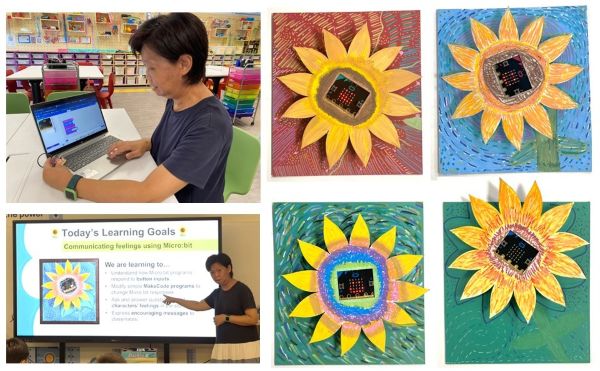
This interdisciplinary lesson integrates English and Art through the story “Camille and the Sunflowers”, helping students explore kindness and empathy while learning about Vincent van Gogh’s artistic style. Using the STELLAR approach, students engage in shared reading, discuss characters’ emotions, and justify their responses. They extend learning through a digital fabrication activity by painting laser-cut sunflowers inspired by Van Gogh’s techniques. Physical computing is incorporated using the Microbit, where students respond to questions and explain their reasoning. A gallery walk allows reflection on how art and technology can express feelings, integrating literacy, art, and social-emotional learning.
Reflection Question 1:
Collaboration: Reflect on how you worked with colleagues or FLA participants during the Field Activity. At what stages of development and testing did the collaborator contribute? Please be detailed in your description. How did your collaborator’s perspective change the way you developed the lesson?
I collaborated closely with a FLA participant, who is also a Primary 3 English and Mathematics teacher in my school, to design and implement this interdisciplinary lesson for a class of 40 students.
Our collaboration began at the planning stage, where we jointly decided to integrate English and Art as the core subjects for this Module 4 field activity. This decision was guided by our shared intention to create meaningful connections between literacy, visual expression, and technology.
During the development phase, we co-created the lesson plan, aligning the learning objectives across English, Art, and Microbit programming. My collaborator contributed her expertise in English by designing and facilitating Part 1 of the lesson, where she conducted a shared reading of Camille and the Sunflowers to help students unpack character emotions and themes. Building on this, I designed and conducted the Art component, guiding students to express emotions through sunflower paintings using colour, texture, and rhythm.
In the implementation stage, we adopted a co-teaching approach. For the Microbit lesson, we took turns facilitating different segments. I introduced Microbit and led the coding and customisation activities, while my collaborator supported students in making connections to the story and facilitated the gallery walk and reflection. This division of roles allowed us to leverage our individual strengths while ensuring continuity in students’ learning experiences.
Finally, I extended the learning through an additional session on Microbit radio communication, deepening students’ understanding of how technology can be used to communicate positive messages.
Collaborating with my collaborator significantly shaped how I developed this lesson. As a Makerspace teacher, I typically design and facilitate activity-based sessions rather than full-class lessons. Through my collaborator’s experience as a classroom teacher, I gained insights into effective teaching pedagogy, lesson structuring, and managing a class of 40 students. She guided me in sequencing the lesson more meaningfully and ensuring clear learning objectives across each segment.
Importantly, Priscilla helped strengthen the interdisciplinary connections by linking the English, Art, and Microbit components cohesively, rather than treating them as separate activities. This shifted my perspective from focusing mainly on hands-on making to designing a more holistic learning experience that integrates content, skills, and reflection.
Overall, this collaboration was iterative and complementary, with both collaborators contributing meaningfully to different stages of planning, teaching, and reflection. The collaboration has also broadened my approach from running Makerspace activities to planning and delivering structured, curriculum-aligned classroom lessons.
Reflection Question 2:
Instructional Challenges: What challenges did you encounter while teaching this lesson? How did you address or plan to address them? How are diverse learners’ needs being met in the lesson plan facilitation?
Several instructional challenges emerged during the implementation of this lesson. Firstly, I had limited Art content knowledge, particularly in crafting appropriate assessment rubrics. This made it challenging to clearly assess students’ artistic processes and outcomes. Secondly, the large class size of 40 students made it difficult to monitor and provide timely support, especially during the Microbit coding activities where students required more guidance.
Technical issues also posed a significant challenge. Many students had limited experience using school laptops, resulting in delays with login credentials and reduced instructional time. In addition, considering students’ ZPD for the Microbit lesson was a concern, as both of us anticipated that some students might struggle to grasp coding concepts within a single session. Time constraints further impacted on the lesson, as the originally planned two sessions (90 minutes each) had to be extended by an additional session. Lastly, logistical challenges such as materials preparation required careful coordination.
To address these challenges, I consulted a senior Art teacher for guidance on lesson design and assessment rubrics. I also researched ideas using ChatGPT and adapted them to suit my lesson context. Pair work was intentionally structured to reduce material demands and encourage peer support. Additionally, I incorporated written reflection activities to capture individual student learning, ensuring that assessment remained meaningful despite the constraints.
To address the technical issue in Part 4 extension activity, students used iPads instead of laptops for the Microbit radio communication activity. While this helped bypass login issues and allowed more time for coding, it introduced new challenges. Students had to manually write the code by referring to printed instructions instead of importing files, and they also needed to pair the Microbit via Bluetooth, which some found difficult. To help overcome this challenge, teacher showed step-by-step through live modelling.
To meet the needs of diverse learners, differentiation strategies were embedded throughout the lesson. In the Art component, students were given choices in emotions, materials, and roles (e.g., flower or background artist), allowing them to work at their readiness level. In the Microbit activities, scaffolded tasks (Level 1 to Level 3) supported progressive learning, while peer pairing enabled stronger students to support those who needed more help. Teacher modelling, guided instructions, and hands-on practice further ensured that all students could access the learning meaningfully.
Reflection Question 3:
Integrating Disciplines: Where does your lesson plan fall on the continuum and why? How might you move the lesson plan along the continuum to the next level? ● Multidisciplinary ● Interdisciplinary ● Transdisciplinary
This lesson is best positioned at the interdisciplinary level. The English, Art, and Microbit components are intentionally connected through a common theme - Camille and the Sunflowers - where students explore emotions, express them through art, and reinforce them using technology. Learning experiences are not taught in isolation; instead, concepts such as feelings, kindness, and expression are transferred across subjects. For example, students interpret characters’ emotions in English, represent them visually in Art, and communicate them through programmed responses using Microbit. This integration demonstrates purposeful blending of disciplines to deepen understanding, rather than simply teaching subjects side by side.
To move towards a transdisciplinary approach, the lesson could be anchored in a real-world problem or authentic context beyond subject boundaries. For instance, students could design a “Kindness Interactive Display” for the school community or lower primary students, using their sunflower artworks and Microbit to spread encouraging messages. They could engage in a design thinking process, gather feedback from real users, and refine their prototypes. This would shift the focus from subject integration to solving meaningful problems, where disciplines become tools to address real-life needs, thus achieving a more authentic and student-driven learning experience.
Reflection Question 4:
AI Usage: If you used AI, describe how it was used and in which steps of the Field Activity.
I used ChatGPT at multiple stages of the Field Activity to support lesson design and implementation:
Planning stage:
• Generate ideas for integrating English, Art, and Microbit
• Refine learning objectives and overall lesson flow
• Ensure alignment across disciplines
Development stage:
• Create teaching resources (e.g. guiding questions, worksheets)
• Suggest differentiation strategies
• Support drafting of assessment rubrics
• Simplify and refine instructions for students
Implementation stage:
• Troubleshoot Microbit coding issues
• Clarify programming concepts when needed
• Provide just-in-time teaching support
Reflection stage:
• Help articulate key reflections
• Improve clarity and structure of learning diary entries
Overall, ChatGPT functioned as a thinking partner, supporting ideation, resource creation, and reflective practice throughout the entire Field Activity.
Reflection Question 5:
Reflect on the course in general:
● How has your teaching changed as a result of this course?
This FLA journey has been a meaningful learning experience for me as an educator.
I have shifted from facilitating activity-based Makerspace sessions to designing more structured, curriculum-aligned lessons. I am now more intentional in applying the ‘digital fabrication with kids’ approach, where students are actively involved in the making process.
I have also learned to integrate multiple disciplines, such as Art, English, Science and Technology, to create more meaningful and connected learning experiences. Beyond just completing a product, I now place greater emphasis on student agency, reflection, and real-world relevance.
Finally, I have grown in confidence in incorporating electronics and basic programming, such as Micro:bit, into my lessons.
Overall, this course has helped me become a more intentional and reflective practitioner in designing learning experiences for my students.”
● What are some concepts that you would like to learn more about?
•IoT (Internet of Things) – understanding how devices communicate and how this can be applied in student projects
• Physical computing integration in classroom contexts beyond simple inputs/outputs
• Assessment in makerspace learning – developing clear rubrics for creativity, process, and interdisciplinary outcomes
• Differentiation strategies for mixed-ability learners in coding and digital fabrication
• Advanced digital fabrication tools (e.g., laser cutting design optimisation, 3D modelling workflows)
• Use of AI to enhance student learning, especially in programmes like the InnoSparks Challenge:
- Supporting students in research and idea generation using age-appropriate AI tools
- Guiding students to use AI for problem analysis, brainstorming, and prototyping ideas
- Exploring how AI can help students refine solutions, generate feedback, and improve their presentations
- Ensuring students use AI responsibly and meaningfully, as a thinking partner rather than a shortcut
• Sustainability – exploring sustainable and eco-friendly materials that can be used in digital fabrication projects, and how these can be integrated into lessons to support sustainability goals (e.g., SDG 12)
● How can you support other teachers in your practice to use digital fabrication with their students?
• Conduct hands-on workshops (e.g. laser cutting, electronic cutting, sublimation printing, simple electronics, Microbit basics) to build teachers’ confidence
• Design ready-to-use lesson packages (slides, templates, materials prep) for easy classroom implementation
• Share successful lesson examples and student artefacts to inspire adoption
• Provide co-teaching opportunities to support teachers during their first implementation
• Create a support system in the Makerspace (e.g., Maker Buddies, resource guides) to reduce teacher workload and technical barriers
Feedback from Collaborator
Here’s the written feedback from my collaborator:
“I truly appreciated the opportunity to collaborate with you during the development of this lesson based on Camille and the Sunflowers. Your contributions played a significant role in shaping the lesson into a more engaging and meaningful interdisciplinary experience.
One of your key strengths was your ability to bridge different domains effectively. Your idea to integrate visual arts inspired by Vincent van Gogh helped ground the lesson in a strong conceptual theme, allowing students to connect emotions from the story to artistic expression. This made the learning more cohesive rather than treating English and Art as separate components.
I also found your suggestion to incorporate physical computing using the BBC micro:bit particularly impactful. The use of Button A and Button B for Yes/No responses was a simple yet powerful way to make students’ thinking visible. It supported participation from all learners and introduced key concepts of input and output in an accessible manner.
Additionally, your emphasis on hands-on learning through digital fabrication, especially the use of laser-cut sunflower templates, added depth to the lesson. This shifted the activity from a traditional art task to a more engaging design experience, giving students a sense of ownership over their creations.
One area for further growth could be to explore ways to extend student agency, such as allowing students to design their own questions or create more personalised responses using the micro:bit (e.g., icons or short messages). This could further deepen both their conceptual understanding and engagement. Overall, your collaborative approach, openness to ideas, and focus on student learning greatly enhanced the quality of the lesson. I look forward to future opportunities to co-design lessons and continue integrating technology, art, and literacy in meaningful ways.”
Area for Improvement
1) Strengthening student agency in the Micro:bit segment. While the Yes/No button responses supported participation, the task was largely teacher-directed. Moving forward, I would allow students to generate their own questions and design personalised outputs, such as icons or short messages. This shift from responding to creating would increase ownership and deepen engagement.
2) Better integration of Art and technology by linking Micro:bit responses to the emotions expressed in their sunflower artwork. Adding an interactive sharing segment would further promote communication and empathy, aligning the lesson more closely with the “learning through making” approach.