Week 13
Assignments
- Task 1: Connect a microcontroller with another device
Process
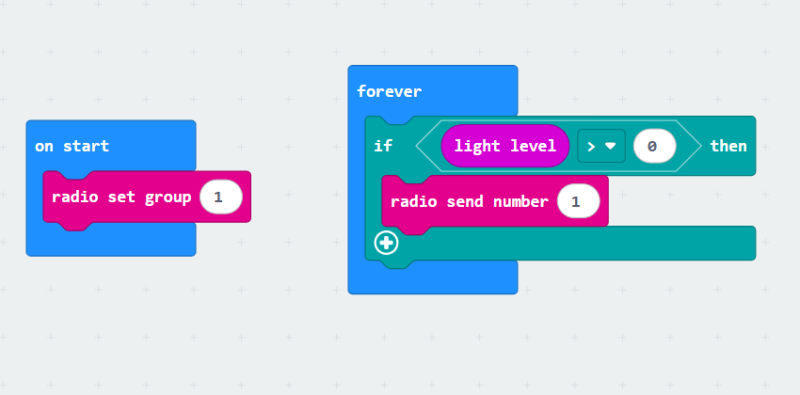
- I wanted to connect two different Microbits via their antenna feature. I went to MakeCode and created a code to send a signal to another Microbit when light hit its light sensor. I downloaded the code to a Microbit and hid it in a chest.
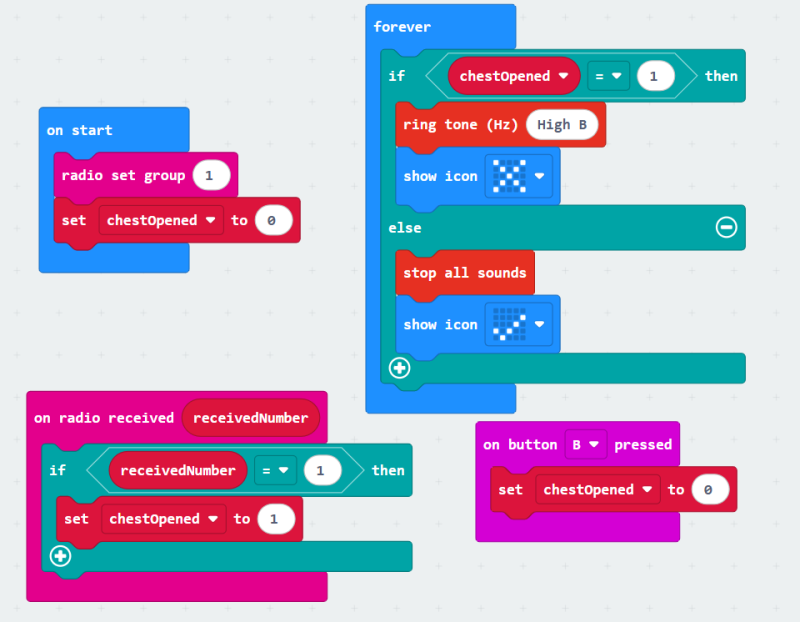
- For the second Microbit, I made a code that made the LED Matrix change and for it to sound an alarm when getting the same radio signal sent by the first Microbit. The alarm could only stop after pressing the B button.
- After both Microbits had the code, I powered them with batteries. I had an alarm that went off if anybody opened the chest!
- Video
Reflection
-What are some opportunities in your context to work within your local community? Who you could collaborate with? How? What should happen to succeed in the collaboration? We work closely with the city of Miami Beach, which is where our makerspace is located. We serve their school with Field Trips, Afterschool Sessions and STEAM classes during the school day. We also contribute to the Homeschool community with our homeschool classes. It’s a lot of coordination and logistics to be able to get everything working, but we are able to serve many students in the community after that effort.
-What are the next steps in development further a makerspace in your school? How do you envision the maker space? We are already a makerspace, but we are working hard to make it a more organized but fluid place.
-What is the potential of physical computing and IoT for your teaching? Do you have any ideas on how you are planning to integrate those techniques in your context? I try to incorporate coding and technology in many of our programs. Physical computing it’s an incredible way to get the students to understand how computers think and how coding works, so I plan to use it as introductions before more advanced programming and computing concepts.
Tools
- Microbits
- Laptop