M4 Week 2
Assignments
- Connect your microcontroller board with another device: it can be another microcontroller, a cloud application, or a mobile phone. They should be able to communicate data generated or sensed using the board to the other end. Alternatively, use your board to receive instructions from the other device.
Process
This week I worked in the Fab Lab creating a Bluetooth Interactive Semaphore. This were the decives & platforms used for this project:
- Endpoint A (Controller): Android Smartphone running the Serial Bluetooth Terminal app.
- Endpoint B (Receiver/Actuator): BBC micro:bit (v2) mounted on a breadboard.
- Communication Technology: Bluetooth Low Energy (BLE) using the UART (Universal Asynchronous Receiver-Transmitter) Service. This allows for wireless serial communication between a mobile device and the microcontroller.
The goal of this project is to simulate a semaphore where a central control system (the phone) sends manual overrides to semaphore lighting (the micro:bit).
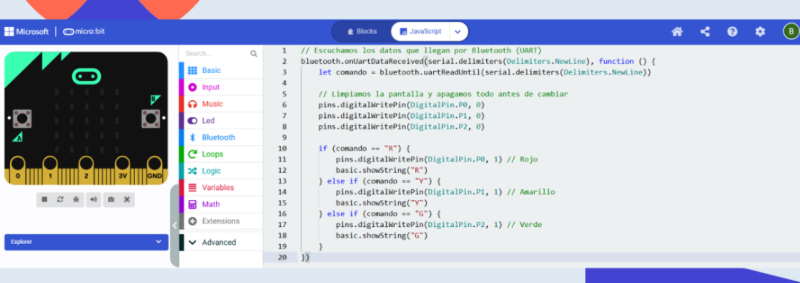
I sent String Data (text commands) from the phone to the micro:bit. Through the Mobile App I send a character (e.g., “G”) over the Bluetooth UART service. The micro:bit recognizes ir and once received, it parses the string and executes a digitalWrite command to the corresponding GPIO pin to light the LED.
To build this, the micro:bit is connected to a breadboard. Each LED represents a different street light state.
Pin 0 (P0) → Resistor → Red LED → GND Pin 1 (P1) → Resistor → Yellow LED → GND Pin 2 (P2) → Resistor → Green LED → GND
With the help of my instructor I used the Microsoft MakeCode editor and added the Bluetooth Extension. I wrote a listener function that triggers whenever UART data is received. I included a “clear all” command at the start of each reception to ensure only one light stays on at a time. In the Serial Bluetooth Terminal app on Android, I configured the buttons to send “R”, “Y”, and “G” followed by a newline character \n so the micro:bit knows when the command ends. I used jumper wires to bridge the micro:bit pins to the breadboard rails, ensuring the common ground (GND) was shared across all three LEDs.
This is the link to the coding on micro:bit and looks like this:
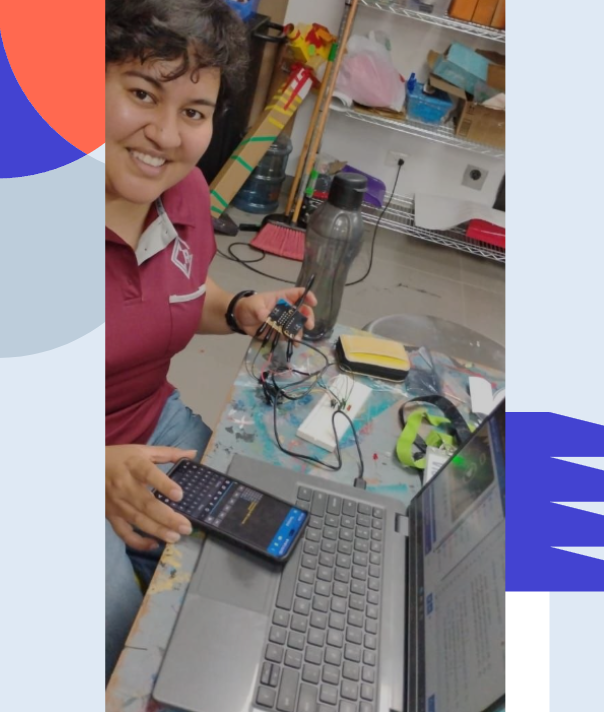
Here is a picture of me while working on this and testing the prototype. It worked! I think this was the most difficult project I have owrked on specially since I had no background on coding but instructor was very supportive and helpful.
Reflection
-
What are some opportunities in your context to work within your local community? Who you could collaborate with? How? What should happen to succeed in the collaboration I have been thinking a lot about this fab lab course opportunity and I think there are great opportunities to collaborate in Guatemalan context, starting by helping our school community by solving problems starting from simple and then moving on more complicated creations and projects. Project examples would involve students helping teachers create functional spaces to organize things in classrooms, design interactive material for other students to have more significative ways of learning, think about designs involving inclusive ideas, etc. After the school context is covered there are many other options that can be adapted like, Inclusive product design for Blind and Deaf schools in the country, Material design for schools with scarce resources, etc.
-
What are the next steps in development further a makerspace in your school? How do you envision the maker space? At the school I’m working with. We’re still working on acquiring our materials for our makerspace and learning about the technologies that can be used for this. I see great future for this space where necessities are going to be as opportunities to develop projects to make life easier for the school community. I envision the makerspace as a space where ideas are welcome, design is empathetic and tecehnology will be at the service of others.
-
What is the potential of physical computing and IoT for your teaching? Do you have any ideas on how you are planning to integrate those techniques in your context? I thinks there is a great potential in implementing physical computing in my teaching. I myself am still learning to use this technology but I think the impact of this kind projects will help students understand their learning environment and ways to improve it by analyzing problems and finding possible solutions. I still don’t have all the knowledge needed for more complex projects but I have some ideas on how to integrate physical computing as a behaviour tracker and possitive reinforcement. But also in the world of art there are various forms to implement this, for example movements sensors that turn on specific lighting on an sculpture piece and sets a different mood depending on the angle or light color. This is just a simple example but I also think it can be related to music or dancing, different art media.
Tools
- Micro:bit
- Computer
- Breadboard
- Leds
- Connectors
- Cellphone
- App: Serial Bluetooth Terminal