Week 10: Internet of Things
Assignments
Connect your microcontroller board with other device: it can be another microcontroller, application in cloud, a mobile phone… They should be able to communicate data generated/sensed using the board to the other end (E.g. of use case: monitoring system for school). You can also use your board to receive instructions from the other device (use case: robotics).
As an extra work, each device might belong to other FLA student from other lab / your own lab.
In your documentation, name the devices you’re using, along with the platform or technology used for communication between them. Clearly explain what you’re measuring and describe how data is communicated between the two endpoints. If you’re using external components, include a simple diagram illustrating how they’re connected. Provide your code (or a link to your code) for both ends, and include screenshots of the online system’s configuration, if applicable. Add several pictures showcasing your project. If possible, include a video demonstration.
In addition, please, answer following reflection questions:
- What are some opportunities in your context to work within your local community? Who you could collaborate with? How? What should happen to succeed in the collaboration?
- What are the next steps in development further a makerspace in your school? How do you envision the maker space?
- What is the potential of physical computing and IoT for your teaching? Do you have any ideas on how you are planning to integrate those techniques in your context?
Process
Since I had already done data transmission between devices in last week’s assignment, I worked on refining the microbit sensor for this week and gathering, transmitting, and sorting multiple data sets rather than just the light sensor.

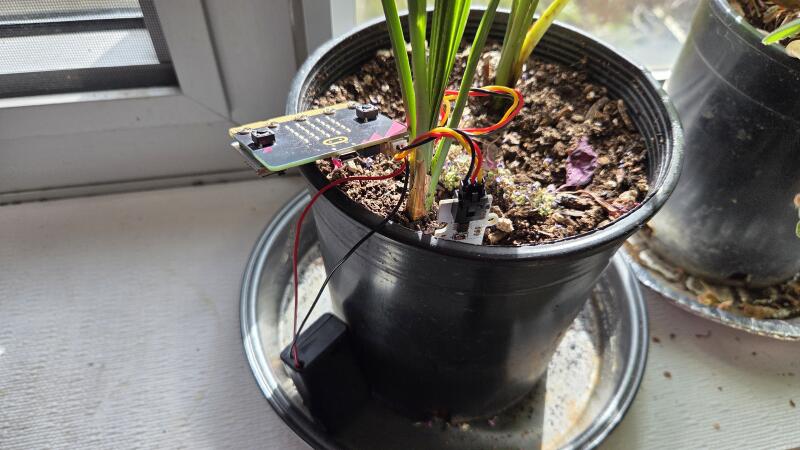
Noel and I discussed ideas for collaborating on the Fourth Field Activity, and combining my light sensor with his idea of plant growth management using soil sensors we came up with a system to collect multiple sources of data from the plant’s environment – ambient light, soil moisture, and temperature. It would also need to collect data asynchronously so that it can all be transferred at once to the receiving computer, rather than collecting in real time.
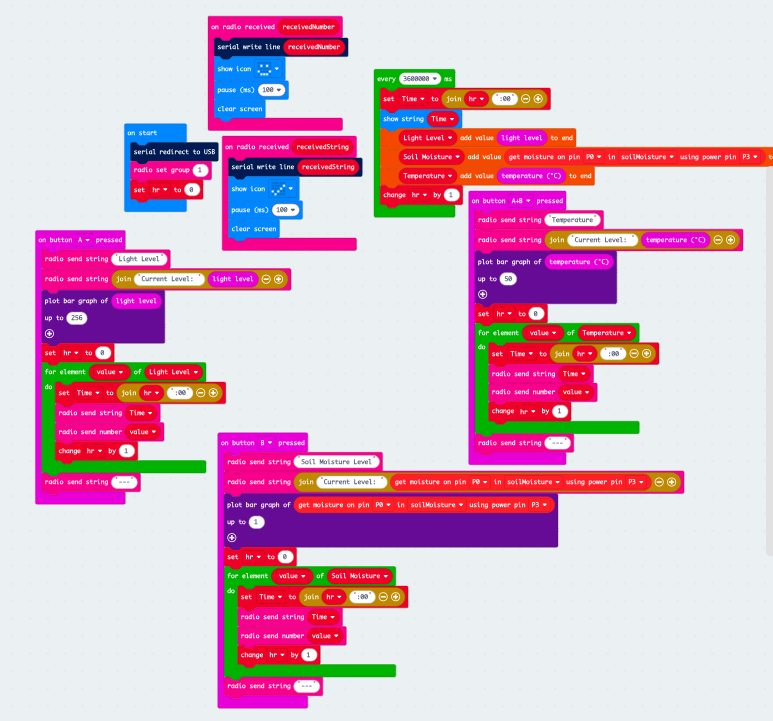
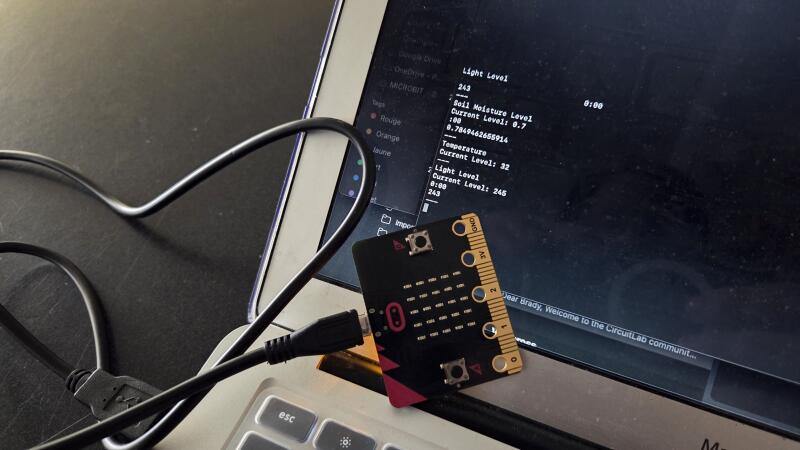
As a result, the code now collects one of each of the three data points once per hour. It functions as a ‘set-and-forget’ system which sets up an array of points that will be stored in device memory. On press of the ‘A,’ ‘B,’ or ‘A+B’ buttons, it transmits the light level, soil moisture, and ambient temperature respectively to the receiver micro:bit, which displays the hourly data. This allows the data to be gathered at any point after setup and does not require the receiver device to constantly be connected to receive live data.
Reflection
- To be frank, this isn’t really my area of expertise. I don’t really know all too much about the local community outside of the school itself. However, one local organisation that I am familiar with is AEST/EAST, the Alliance pour l’Enseignement de la Science et de la Technologie, which hosts the Greater Montreal Science Fair and the Canadian Robotics Competition to encourage students to excel in areas of science, arts, and engineering. I have been taking our Robotics team to the CRC for a few years now and find it to be a rewarding and encouraging event for students who attend. A closer partnership between our Fab Lab and this organisation could potentially be mutually beneficial(?).
- As I stated in last week’s reflection, I think the main priority for LCC’s makerspace is to really encourage students to use it. There are a handful of students between Grades 7 and 12 who are regular visitors and make use of our embroidery machine, biomaterials ingredients, 3D printers, vinyl cutters, or laser cutter, but for the wider student population it remains an enigma or somewhere to go the week before Personal Project is due. To further the makerspace at this school, we need to let students know that they’re always welcome in to make whatever they want — or even when they don’t know what they want to make, but just make something. At LCC, students are required to take Design classes in Grades 7 and 8, but then it doesn’t become an optional course option again until the Tenth Grade. Often, students never set foot in the FabLab again after finishing Middle School, and that is a shame.
- I have always been a bit wary of IoT, as corporations keep trying to get us to buy dishwashers, refrigerators, microwaves, toasters… these appliances do not need to be connected to your phone! But on the other hand, we have also integrated IoT in our lives in many more useful ways. Our classrooms at LCC use Apple TV devices with our projectors and SMART Boards, which allows us to wirelessly project a MacBook or iPad screen to the front of the board. In Science, we have a wide array of Vernier sensors that can send a variety of information to the computer. Using physical computing to show students how these devices work can be very valuable.
Tools
- Two micro:bits
- Microsoft MakeCode for micro:bit
- GatorSoil Soil Sensor